My colleague, Andrew Henning, recently wrote an excellent article (Actuarial process optimisation: Bridging the gap between Python and Excel through xlwings) on xlwings, a Python library that lets you replace VBA with Python inside Excel. It makes a clear, practical case for bridging Python and Excel, for those of us who struggle to let go of Excel as a key interface and control. (Yes, I recognise the irony of saying “Excel” and “control” in the same sentence, but I am serious.) I reviewed Andrew’s article and agree with the thrust: Xlwings is a slick tool that enables local or server-side processing, manages latency sensibly and keeps your data where you want it.
I have long leaned towards user-defined functions (UDFs) to expand Excel. UDFs have always felt more elegant than macros to me: much of the power, without the clunkiness and fragility. A well-designed UDF sits seamlessly inside the calculation graph, recalculates when its inputs change, and behaves like a native Excel function. It’s a better production environment than a macro that mutates the workbook behind your back, and far more reliable in the face of ubiquitous terrible Excel practices of not using named ranges and too-liberal use of offset, indirect and even VLOOKUP.
For at least 20 years though, I’ve wanted to go further. Not just replacing VBA with a better language, but replacing it with a faster one. VBA is interpreted, single-threaded and slow. (Implementing a binomial tree model for derivative valuation was a fun project, but the sluggish recalculation when applying this over many option valuations was not.)
Python, for all its virtues, is also interpreted, constrained by the Global Interpreter Lock (GIL), and adds the overhead of a COM bridge when called from Excel – capable and popular, but not the language to reach for when performance is the constraint.
Making Excel itself faster is a different problem: You need functions that run inside Excel's process space, exploit its multi-threaded recalculation engine, and perform like native code. That requires compiled code. For many years, the only path was writing C against the raw Excel C API, an experience so painful that I, like most actuaries, never quite got around to it.
Spreadsheets remain a dominant analytical interface in actuarial practice. Platforms like Milliman Mind take this further, compiling spreadsheet logic and pushing computation to the cloud, with improved controls and governance, all while preserving the familiar Excel interface. For teams with access to such platforms, these are often the right answer. This article is concerned with a lighter-weight question: What can an individual actuary or small team do, today, with free and open-source tools, to get compiled performance inside Excel as a direct alternative to Python and xlwings?
Enter Excel-DNA: What it offers actuaries
Excel-DNA is an open-source library for writing Excel add-ins in C# and compiling them into XLL files. It has been actively developed since 2005 by Govert van Drimmelen in Johannesburg, and supports .NET 6 and above. It is free for all use, including commercial, under a permissive Zlib licence.
What it gives you is significant:
In-process execution. Your code runs inside Excel’s own process. There is no COM bridge, no inter-process communication, no serialisation overhead. When Excel calls your function, it’s a direct method call, the same mechanism Excel uses for its own built-in functions.
True multi-threading. Mark your functions as thread-safe, and Excel’s own recalculation engine will dispatch them across all available cores. Five hundred bond valuations on an eight-core machine run eight at a time, with no additional code. This is simply not possible with xlwings, where the COM bridge serialises every call. Within a single function, C# also supports genuine parallel loops via Parallel.For, with real shared-memory threads rather than the process-spawning workarounds Python requires.
Compiled performance. C# compiles to native code via the .NET JIT compiler. For numerical work (discounted cash flows, interpolation, simulation loops) this is typically 10 to 50 times faster than equivalent Python, before accounting for the COM overhead that xlwings adds on top.
Single-file deployment. An Excel-DNA add-in packs into a single XLL file. No Python installation. No conda environments. No PATH configuration. No IT battles over pip. You distribute one file. The user loads it. It works. Corporate security policies may require the XLL to be code-signed and distributed via a trusted internal channel, since XLLs are native binaries that Excel treats with appropriate caution. In practice, this is straightforward to manage, and the attack surface of a single signed binary is considerably smaller than a full Python installation with its chain of third-party package dependencies.
Type safety. C# catches type errors at compile time within your codebase. If your bond valuation function expects a yield curve and your stress module accidentally passes it the wrong object, the compiler rejects it before the code ever runs. At the Excel boundary, mismatched inputs produce clean #VALUE! errors rather than buried tracebacks. The result is that entire classes of bugs are eliminated during development rather than discovered in production.
Stronger governance. Andrew’s article rightly notes that Python brings version control, unit testing and code review to actuarial workflows – significant advantages over VBA. C# inherits all of these, and adds compile-time validation. A compiled XLL is an immutable artifact. Unlike a .py file or a VBA module, it cannot be casually edited by a user. What you test is what runs.
What it costs you: Actuarial trade-offs of switching to Excel-DNA
Intellectual honesty demands the other side.
Learning curve. C# is a statically typed, compiled language. If your team’s experience is Python and R, there is real activation energy to overcome. The syntax is familiar if you have any C, C++ or Java background, and modern C# is a remarkably pleasant language, but the .NET project system, NuGet package management and Visual Studio tooling will all be unfamiliar at first.
Smaller actuarial ecosystem. Python’s actuarial open-source community (chainladder, lifetables, the broader data science stack) is far more developed than what exists in C#. The .NET world has solid numerical foundations (Math.NET Numerics is free and covers linear algebra, distributions and interpolation well) and more comprehensive commercial options (Numerics.NET offers GLMs and advanced statistics, but at a cost). What you won’t find are actuarial-specific libraries or the sheer breadth of Python’s data science ecosystem. For exploratory analytics and modern predictive modelling, Python wins. Excel-DNA is strongest for computationally intensive but analytically straightforward tasks: DCF valuations, stress testing, simulation, curve construction.
Specific skills required for governance and assurance. The XLL itself is an opaque binary. If someone loads an outdated build, a test version or a file with a known defect, the workbook will calculate without complaint. The mitigation is simple but must be deliberate. Embed a version-reporting function and display it prominently in the workbook. Better still, have the environment builder validate the XLL version against a value the workbook expects, and refuse to proceed if they don’t match. Version discipline around compiled add-ins is not optional; it is part of the control framework. Anyone who has had a workbook link to the wrong version of another workbook will know the importance of diligence here.
Desktop only. Excel-DNA is a desktop performance play. Your code runs inside Excel on the user’s machine, which is the source of its speed but also its ceiling. If you need to scale beyond what a single workstation offers, xlwings Pro has a more natural path to server-side execution (since Python already runs out-of-process, moving it to a remote server is a smaller architectural leap), and platforms like Milliman Mind are well-designed for cloud-scale computation from the outset. Excel-DNA is the right tool when the bottleneck is, “I need 500 bond valuations to finish before my coffee gets cold,” not, “I need 10,000 cores for an hour.”
Shared fate with Excel. The flip side of in-process execution. If your code has an unhandled bug (an infinite loop, a stack overflow, a catastrophic memory error) it takes Excel down with it. Python running via xlwings is a separate process; if it crashes, Excel survives. In practice, C#’s memory safety and exception handling make this rare, but it means you need to be disciplined about error handling in production code.
A worked example: Bond portfolio stress testing using Excel-DNA
Xlwings optimises for developer accessibility; Excel-DNA optimises for runtime performance and deployment simplicity. They sit at different points on a trade-off curve, and both have their place.
To make this concrete, consider a task familiar to anyone working with Solvency II or South Africa’s Solvency Assessment and Management (SAM) capital requirements: valuing a portfolio of bonds under stressed yield curves to determine the interest rate risk SCR.
The workflow is straightforward. You have a portfolio of several hundred bonds. Each needs to be valued under a base yield curve and under stressed (upward and downward) yield curves. The present value under each scenario is a standard discounted cash flow calculation: project the coupon and principal cash flows, discount them using the relevant curve, sum. The capital charge is driven by the worst portfolio-wide impact across the stress scenarios.
In VBA or xlwings, you face a choice. Either you call a valuation function per bond (simple, but incurs COM overhead on every call) or you pass the entire portfolio in a single batch call (faster, but monolithic and harder to debug). Neither option gives you easy parallelism. Python can parallelise within a batch call using multiprocessing, but at the cost of duplicating data across processes and adding significant overhead.
With Excel-DNA, the architecture is cleaner. You separate the problem into two stages.
Stage 1: Build the market environment. A single cell calls a function that reads the yield curve data, stress parameters, and any other market data from the workbook, constructs interpolated curve objects, and returns a cached object handle. This runs once, and the overhead is trivial.
Stage 2: Value each bond. Every bond row calls a thread-safe UDF that takes the environment handle and the bond’s own data (nominal, coupon, maturity, frequency, credit quality), and returns an array of present values: base, interest-up, interest-down and spread-stressed. Because the function is marked thread-safe and is a pure function of its inputs, Excel dispatches all several hundred calls across available cores simultaneously. On an eight-core machine, you approach eight times the throughput of a sequential implementation.
The per-asset granularity buys more than just speed. Each bond that fails (bad data, a maturity date in the past, a missing curve tenor) fails independently. You see exactly which row has a problem. You can debug a single bond by calling the function manually with its inputs. And when someone changes one bond’s coupon rate, only that row recalculates, not the entire portfolio.
For the portfolio-level aggregation (determining whether the up-stress or down-stress bites across the whole book, computing the diversified interest rate risk SCR), a final function takes the full matrix of per-asset results and performs the aggregation. This step is computationally trivial, since the heavy lifting is already done.
The result is a workbook where intermediate values are visible, every bond valuation is auditable, and the whole thing recalculates in seconds rather than minutes.
Getting started with Excel-DNA
The entire toolchain is free. You need the .NET SDK (open source, from Microsoft), the Excel-DNA NuGet package and an editor. Visual Studio Community, VS Code with the C# extension or JetBrains Rider all work. The first “hello world” UDF (a function that appears in Excel’s function wizard and returns a value) takes about 30 minutes to set up, including the project scaffolding.
For actuaries with any prior exposure to C, C++ or Java, the learning curve is manageable. The core of the work, writing functions that take arrays of numbers and return arrays of numbers, is procedurally straightforward. The sophisticated parts of C# (dependency injection, async patterns, LINQ) are available when you want them but not required to get started.
See the appendix for an example of the C# code and Excel usage for a simple proof of concept.
Governance and the dual-track opportunity of Excel-DNA
The immutability of a compiled add-in opens an architectural pattern worth considering: a dual-track workbook. Track 1 exposes every intermediate calculation in the spreadsheet (per-asset valuations, sub-module aggregations, final results), providing the transparency that auditors and regulators expect. Track 2 runs the identical calculation inside a single compiled function that takes the same inputs and returns the same outputs. A reconciliation cell compares the two tracks. If they disagree, something is wrong and you investigate.
The value of this pattern is that it separates concerns that are usually tangled together in actuarial spreadsheets. The compiled track provides integrity: version-controlled, tested, deterministic. The spreadsheet track provides transparency: every number visible, every assumption traceable. The reconciliation provides assurance.
Closing thoughts on Excel-DNA for actuaries
The actuarial profession needs to keep exploring new tools. Xlwings extends Excel’s reach into Python. Excel-DNA brings compiled performance and single-file deployment at no cost, with a tool built and maintained here in South Africa. Platforms like Milliman Mind take computation to the cloud. The right choice depends on the problem.
The governance around these tools matters too. A head of actuarial function signing off on a capital calculation needs assurance not just that the spreadsheet is correct, but that any compiled code behind it is sound, that testing is adequate and that deployment controls are robust. Providing that assurance requires familiarity with the regulatory framework, an understanding of the actuarial substance, and the technical skill to evaluate software architecture and code quality. As our tools grow more sophisticated, so must the skills of those who build and review them.
Appendix: Excel-DNA implementation example details
For readers who want to see what the implementation actually looks like, this appendix walks through the C# for one Excel-facing function and the workbook formulae that call it.
What the C# code looks like
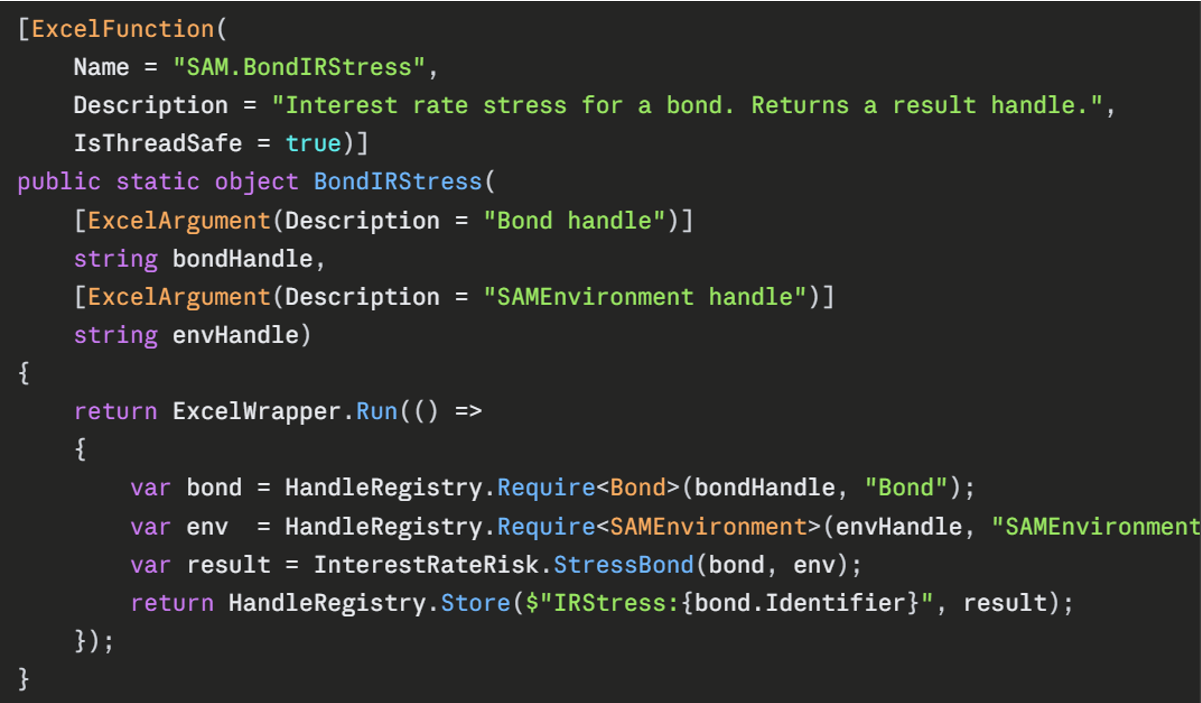
For those curious about what this actually involves in practice, the accompanying image shows the implementation of SAM.BondIRStress, which is the function called from each bond row in the workbook to produce that asset's interest rate stress result. It is representative of how every per-asset stress UDF in the add-in is structured.
A few things are worth drawing out.
The [ExcelFunction] attribute is what makes the method visible to Excel. The Name field controls how it appears in cells and in the function wizard. The Description is what users see in the wizard when they highlight the function. IsThreadSafe = true is the line that opts the function into Excel's parallel recalculation engine. With this set, Excel will dispatch hundreds of bond rows across all available cores simultaneously. Without it, Excel calls the function sequentially on a single thread, regardless of how many cores the machine has.
The two parameters are both plain strings. This is the handle pattern in action. The bond's properties (face value, coupon rate, maturity, frequency, currency, seniority, credit quality, infrastructure and ILB flags, issuer) were captured once at construction time via a separate SAM.Bond(...) call, which stored the resulting object in an in-process registry and returned a string identifier. The same is true of the SAM environment, which holds the yield curves and equity symmetric adjustments. The stress function takes only those identifiers; the HandleRegistry.Require
The function returns a string handle of its own, pointing to a result object that holds every output of the interest rate stress: the base value, the delta under the upward stress, the delta under the downward stress and so on. The workbook extracts whatever fields it needs using a separate SAM.Get(handle, "FieldName") function. This is more flexible than returning a fixed-shape array of numbers. Adding a new output to the stress calculation, or reordering the fields, requires no change to the workbook layout. Only the cells that ask for the new field need to be added. It also keeps the per-bond row clean: a single call producing a single handle, with downstream cells pulling out only the numbers they care about.
The ExcelWrapper.Run(() => ...) wrapper around the body is a small piece of infrastructure that catches any exception thrown by the inner code and translates it into a clean Excel error value. Without this, an unhandled exception would propagate as a generic #VALUE! with no diagnostic information; with it, the user sees a meaningful error message identifying which input was wrong.
What is conspicuous by its absence in the function body is anything resembling Excel-specific code. The actual calculation lives in InterestRateRisk.StressBond(bond, env), a plain C# method that takes a Bond and a SAMEnvironment and returns a result. It knows nothing about Excel, has no dependency on the Excel-DNA library, and can be unit-tested in isolation with no Excel installed at all. The Excel-facing UDF is a thin shim that handles marshalling at the boundary; everything substantive happens in pure C# code that lives in separate files organised by domain (valuation, risk modules, aggregation, and models). This separation is what makes the add-in easily testable, and it is the structural difference that most distinguishes a well-designed Excel-DNA project from the kind of VBA codebase where business logic and UI manipulation are tangled together in the same procedure.
The full source for the add-in is a few thousand lines of C# organised into about 20 files, of which the Excel-facing entry-point file shown here is a small fraction. Everything else is the actuarial logic, written as ordinary, testable C# with no Excel dependencies at all.
What the Excel workbook looks like
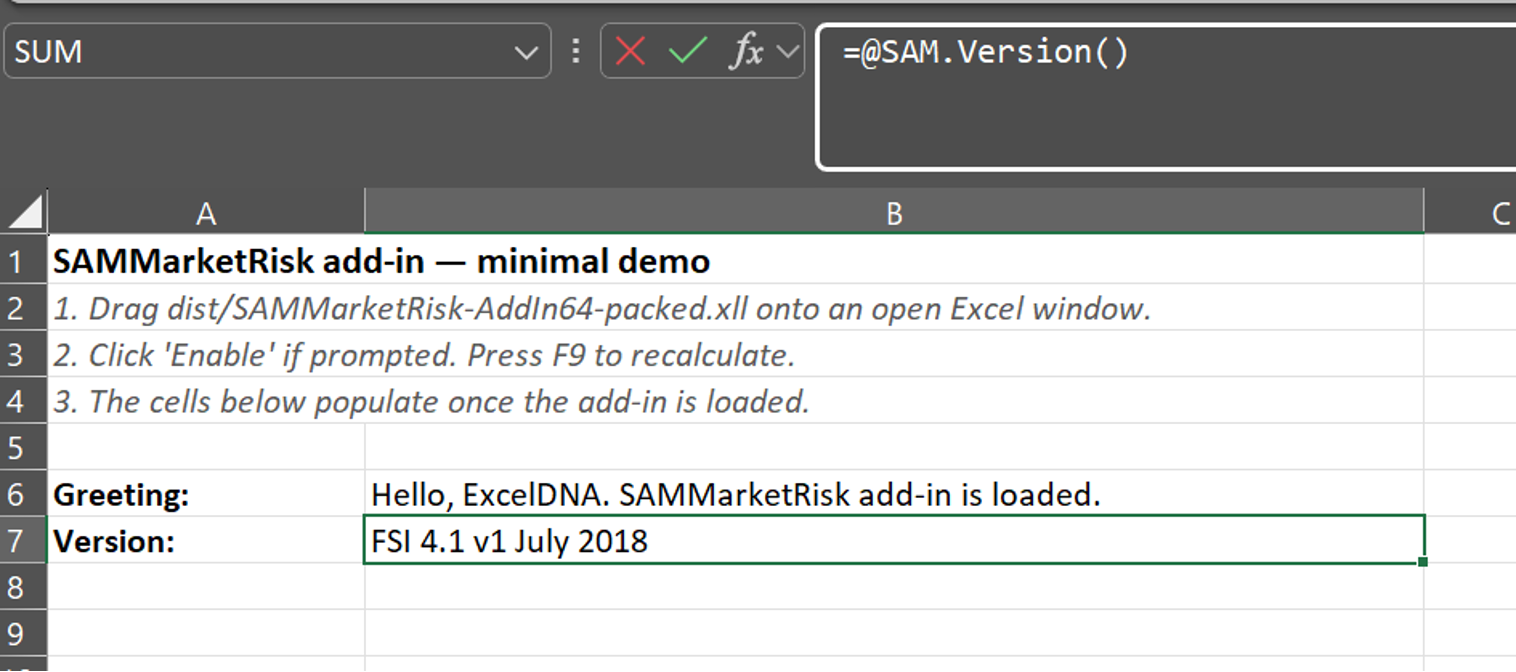
First, here’s an example of a function created to generate and confirm the version of the underlying add-in used. In this case, it just refers to the FSI version applied, but you could include revision details of the particular model as well.
Then there are the functions that set up the environment. In this case SAM.YieldCurve loads the nominal yield curve and returns a handle. The environment handle current takes the valuation date, yield curve handle and parameters for the various equity symmetric adjustments. In a more complete example this would include at least the real yield curve and equity symmetric adjustment too. It’s a modelling choice whether the other stresses are loaded in as environment variables (flexible) or hard coded within the add-in (simpler to use and less likely to make an unintentional change).
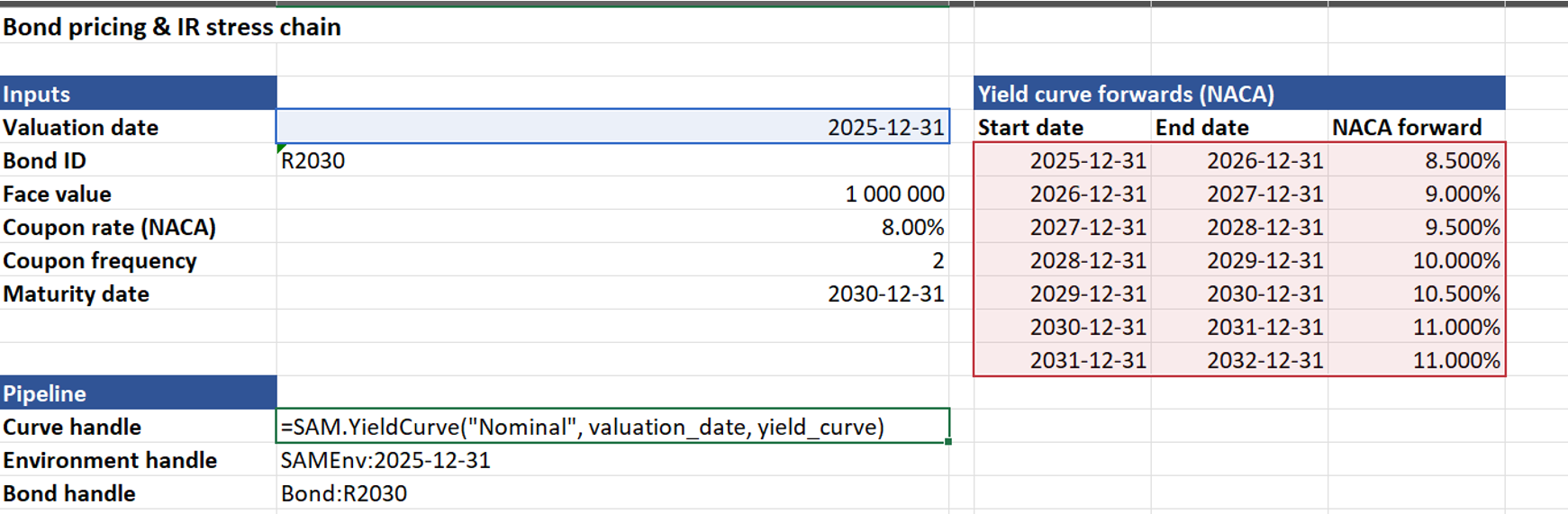
The demo example uses two more handles – one to identify the bond and another to run the required stresses and return the handle where these values can be accessed later. The screenshot below shows the formulae.
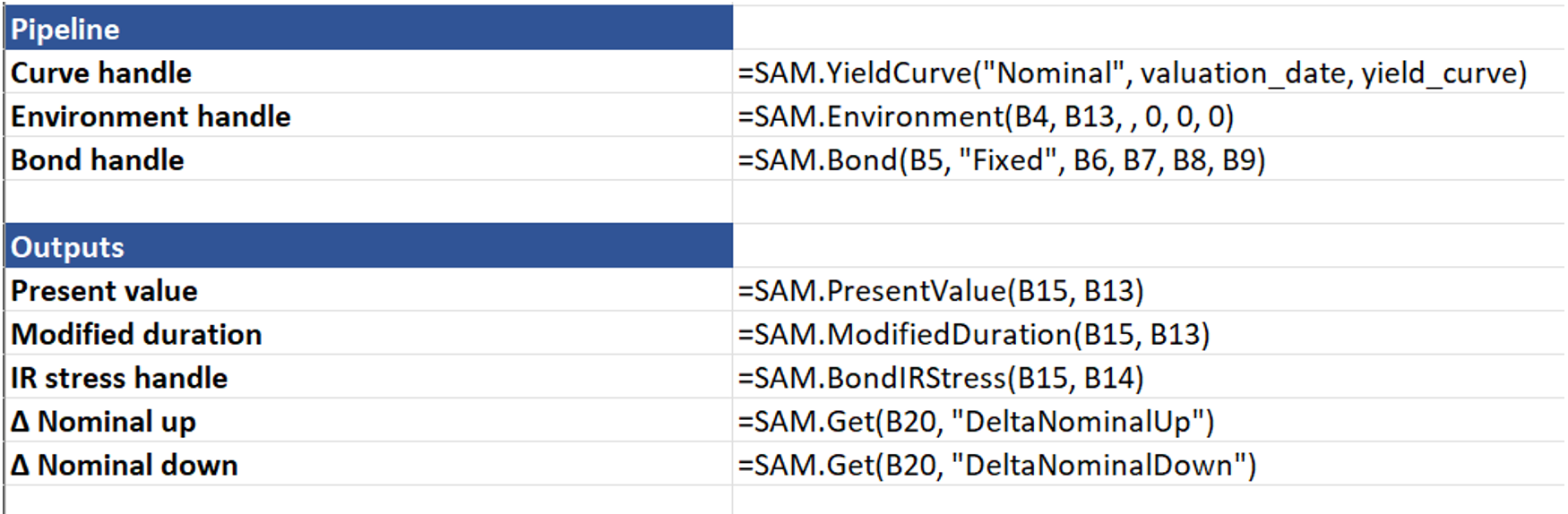
In summary, one can create a new set of compiled, fast and parallel user-defined functions for cleaner, less-error-prone models.